How to Manage Top Sold Products Section in Storex Pro?
1. How to Add a Top-Selling Products Section on the Homepage.
From your dashboard, go to the Appearance > Customize > Homepage Sections > Top Sold Products
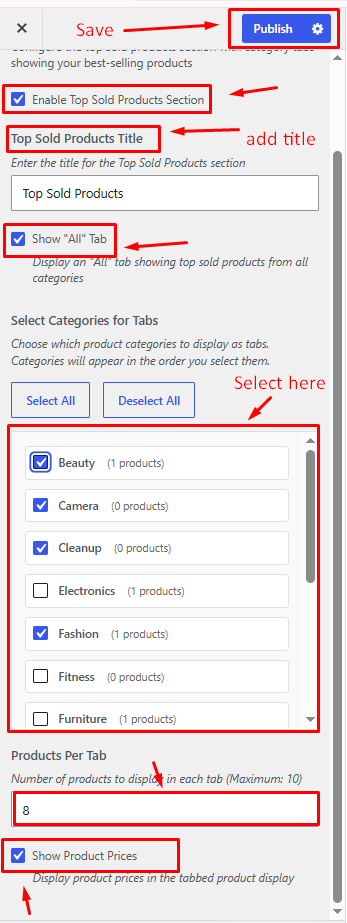
Enable Top Sold Products Section: Show or hide the Top Sold Products section on the homepage.
Top Sold Products Title: Enter the heading displayed for the Top Sold Products section.
Show "All" Tab: Display or hide the "All" category tab.
Select Categories for Tabs: Choose the product categories to display as navigation tabs.
Products Per Tab: Specify the number of products shown within each tab.
Show Product Prices: Enable or disable product price display.
Publish Changes: Save and apply your settings.