How to Manage Video Section in Storex Pro?
1. How to Add a Video Section on the Homepage.
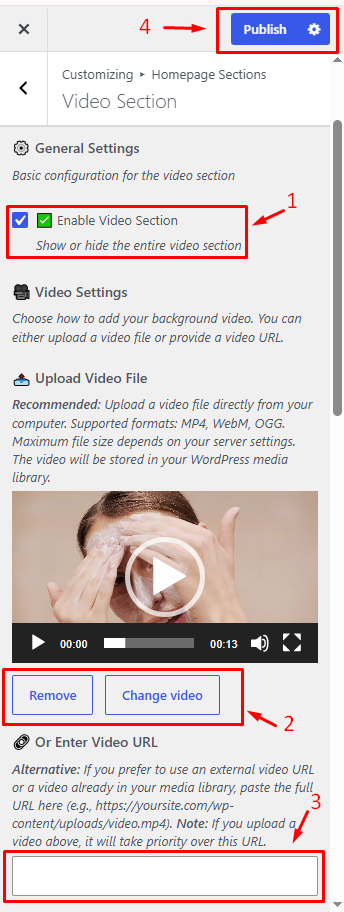
From your dashboard, go to the Appearance > Customize > Homepage Sections > Video Section
1. Enable Video Section: Show or hide the video section on the homepage.
2. Upload Video File & Enter Video URL on the homepage
3. Publish Changes, Save, and apply your settings.
2. How to Manage the Video Section Content Settings on the Homepage.
From your dashboard, go to the Appearance > Customize > Homepage Sections > Video Section
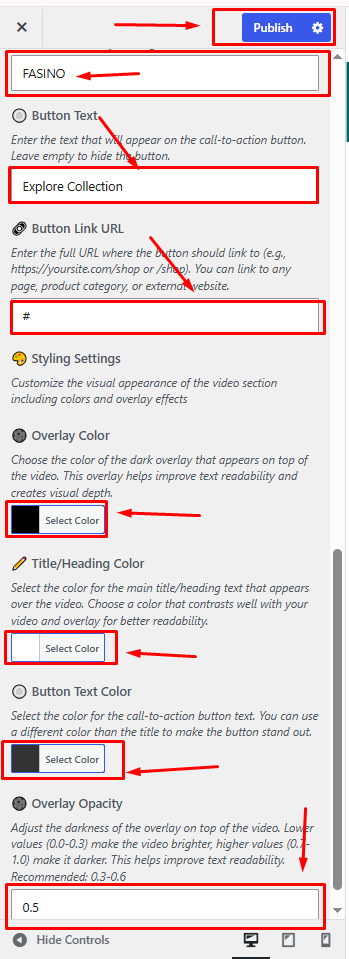
1. Manage the main title on the homepage.
2. Manages Button Text on the homepage.
3. Add Button Link URL in the btn.
4. How to update Overlay Color on the video section.
5. How to change Title/Heading Color & Button Text Color on the video section.
6. How Manages Video Overlay Opacity.
7. Publish Now