How to Manage Latest Offers Section in Storex Pro?
1. Latest Offers Section Settings
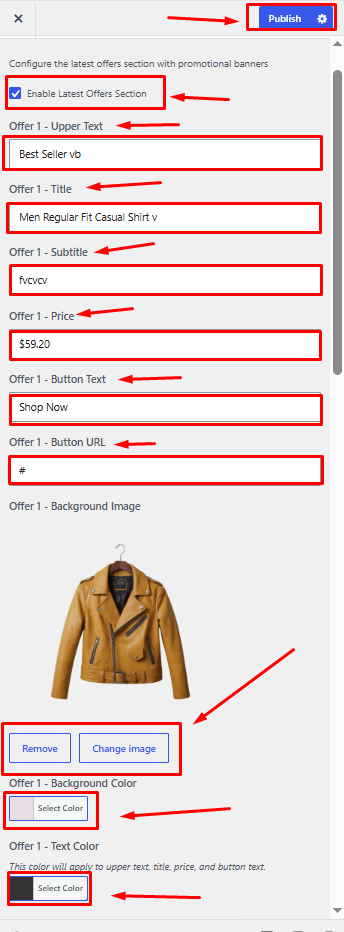
From your dashboard, go to the Appearance > Customize > Homepage Sections > Latest Offers
Enable Latest Offers Section: Enable this option to display the Latest Offers section on the homepage.
Offer - Upper Text: Enter a short promotional label or tagline displayed above the offer title.
Offer - Title: Enter the main title of the offer.
Offer - Subtitle: Enter a brief description or subtitle for the offer.
Offer - Price: Enter the offer price or discount amount.
Offer - Button Text: Enter the text to be displayed on the call-to-action button.
Offer - Button URL: Enter the destination URL for the offer button.
Offer - Background Image: Upload or select an image to be displayed as the offer background.
Remove: Click to remove the currently selected image.
Change Image: Click to upload or select a different image.
Offer - Background Color: Select a background color for the offer section.
Offer - Text Color: Choose the text color for the upper text, title, price, and button text.
Publish Settings: Click the Publish button to save and apply all the Latest Offers section settings.